| Vendor Demonstration Scenario |
|
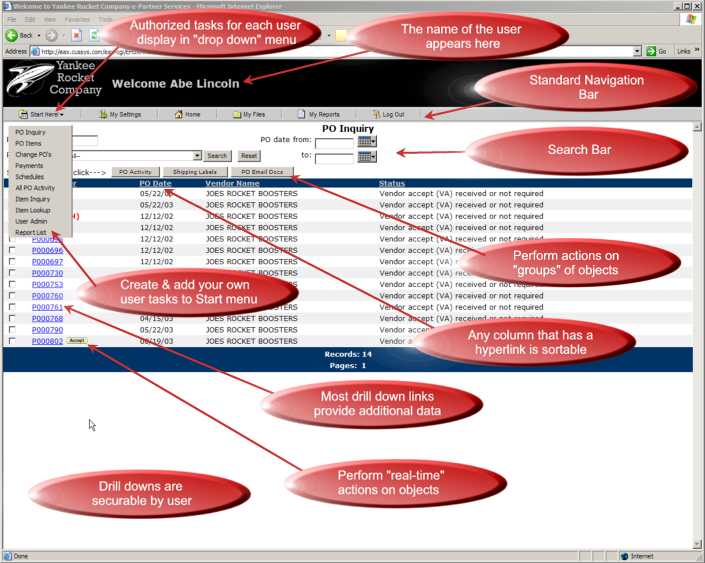
Your company is the Yankee Rocket Company, the largest manufacturer and distributor of model rockets in the United States. Your biggest supplier is Rocket Boosters, Inc.. The customer service representative at Joe's Rocket Boosters is a hard working fellow by the name of Abe Lincoln. You have given him access to his customer orders with you on your system (i.e. your purchase orders) via EAX. When he logs on via the new Vendor Service link on The Yankee Rocket Company corporate website, he is prompted for, and enters his sign-on and password. He is securely routed to a Welcome screen that displays a "menu" of the tasks he has been authorized to execute. From that menu, as shown in the example below he has selected "PO Inquiry". The data that he sees is "real time", exactly as it exists at that moment in the data base of your iSeries 400.
|
 |
|
EAX Standard
Navigation Bar
|
The Navigation Bar for each
user is the same, but the tasks, objects and options available to each
user will vary based upon their individual user profile. Navigation bar
includes:
Each option on the Navigation bar is briefly explained below.
|
| EAX Administrative Module |
|
EAX has an Administrative module where you make the connection between which ePartner is logging on (a customer, a vendor, a salesrep, an employee, a regional manager, etc.), and who that ePartner is in your iSeries 400 enterprise database. The connection is called "Business Entity Cross-referencing". Via an entry in an table, the user ID and password chosen by the ePartner is linked to a single (or multiple) customers, vendors, salesreps, etc. using the same database used by your business applications. No downloading to another server, no maintaining multiple databases! That unique user ID and password combination also has a profile of tasks and sub tasks authorized to it. Each different user that logs in sees only the tasks and sub-tasks authorized to them; and only the data corresponding to the business entity to whom they are cross referenced. |